Rotate Image: 90-Degree Clockwise Transformation
The "Rotate Image" problem involves rotating a 2D matrix (or image) by 90 degrees clockwise in place.
Problem Statement
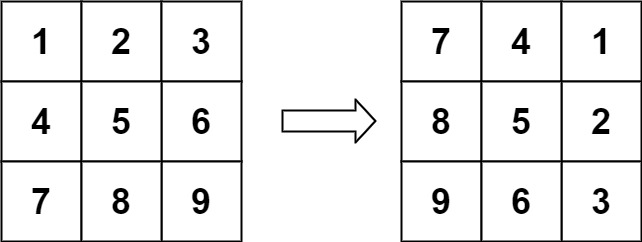
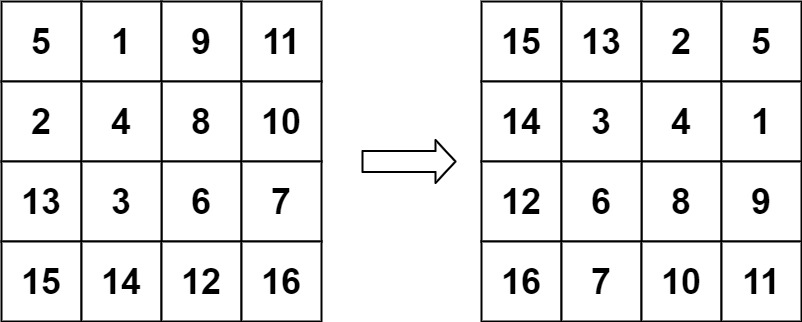
Given an n x n matrix representing an image, rotate the image by 90 degrees (clockwise). You have to rotate the image in place, which means you have to modify the input 2D matrix directly.
Example
- Input: Matrix
[
  [1, 2, 3],
  [4, 5, 6],
  [7, 8, 9]
]
- Output (after rotation):
[
  [7, 4, 1],
  [8, 5, 2],
  [9, 6, 3]
]
Solution Approach (typescript)
Breaking Down the Solution
- Transpose the Matrix: Swap elements across the diagonal to transpose the matrix, turning rows into columns.
- Reverse Each Row: Reverse the elements in each row to achieve the 90-degree clockwise rotation.
Solution Approach (go)
In this Go program:
- The
rotatefunction first transposes the matrix by swapping elements across its diagonal. - Then, it reverses each row of the matrix. This combination of transposition and reversal results in a 90-degree clockwise rotation.
- The
mainfunction demonstrates the usage of therotatefunction with a sample matrix.
Solution Approach (cpp)
#include <iostream>
#include <vector>

void rotate(std::vector<std::vector<int>>& matrix) {
    int n = matrix.size();

    // Transpose the matrix
    for (int i = 0; i < n; ++i) {
        for (int j = i; j < n; ++j) {
            std::swap(matrix[i][j], matrix[j][i]);
        }
    }

    // Reverse each row
    for (int i = 0; i < n; ++i) {
        std::reverse(matrix[i].begin(), matrix[i].end());
    }
}

int main() {
    std::vector<std::vector<int>> matrix = {
        {1, 2, 3},
        {4, 5, 6},
        {7, 8, 9}
    };

    rotate(matrix);

    // Output the rotated matrix
    for (const auto& row : matrix) {
        for (int val : row) {
            std::cout << val << " ";
        }
        std::cout << std::endl;
    }

    return 0;
}
In this solution:
- The function
rotatetakes a reference to a 2D vector (representing the matrix) and modifies it in place. - First, the matrix is transposed by swapping elements across the diagonal.
- Then, each row of the matrix is reversed. This combination of transposing and reversing the rows results in a 90-degree clockwise rotation.
- The
mainfunction demonstrates the usage of therotatefunction with a sample matrix and prints the rotated matrix.
Conclusion
The Rotate Image problem is a classic exercise in matrix manipulation, demonstrating in-place transformations. It's a practical scenario in image processing and graphical applications, testing one's understanding of array operations and geometry.
Rust Solution
The &mut Vec<Vec<i32>> parameter is a mutable borrow, so rotate mutates the caller's matrix in place and returns nothing — ownership stays with main, which declares let mut m and hands over &mut m. The swap deliberately uses an explicit let tmp = matrix[i][j]; rather than a mem::swap-style helper: because i32 is Copy, indexing reads the value out by copy instead of borrowing, which sidesteps the borrow checker's refusal to hold two mutable references into the same Vec at once. The row flip then leans on the in-place slice method matrix[i].reverse(), and println!("{:?}", m) uses {:?} debug formatting to dump the nested Vec.
Comments (0)
Stub — comments live in your browser only (localStorage). No server round-trip yet.
No comments yet. Be the first.